UCS / BO Profiles
The final step in the Constrain Stress workflow is to calculate the UCS and/or Breakout profiles for the data in your analysis using the UCS / BO Profiles form (Advanced Stress & failure > Constrain Stress > UCS / BO Profiles). In the Setup button group you have already specified information on the magnitude of Sv and the orientation of SHmax, wellbore orientation, rock properties and pore pressure. On this form, you can specify breakout width and equivalent mud weight data to aid in the calculation of the profiles.
After being calculated, the profiles can be displayed in the Stress Polygon view. Inside the Stress Polygon view you will find a polygon that defines the limits of the Mohr-Coulomb failure for frictional equilibrium of pre-existing faults. Plotted along with the polygon are the magnitudes of the horizontal stresses consistent with failure occurrences as a function of compressive and tensile strength of the rock.
To calculate the UCS and Breakout profiles
- Choose between the Log based and Depth based calculation modes.
- Log based mode uses only the input logs to produce the profiles over a specified depth range represented by the log data.
- Depth based mode allows you to specify a depth at which the profiles should be created.
- If you have selected the Log based mode, the Min and Max depth fields are activated where you can specify either the depth range in MD or TVDRT. You can also enter the sampling rate in lower section of the form if you have selected UCS/T0 profile type.
- If you have selected the Depth based mode, specify the MD or TVDRT value you wish to assess.
- Optionally, specify a sliding friction coefficient log. You can also opt to specify a constant value for the breakout width. To do so, check the use constant checkbox and provide a value.
- Optionally, specify a breakout width log. You can also opt to specify a constant value for the breakout width. To do so, check the use constant checkbox and provide a value.
- Optionally, define the mud weight equivalent pressure data by selecting a log, specifying a constant or applying ΔP. Check the use constant checkbox to specify a constant value, or check the use ΔP box to specify a value for the required differential pressure.
- Select the profile type between UCS/T0 or Breakout.
- Click (Re)Calculate to calculate the selected profile. When finished, click the Show button to open the Stress Polygon view to review the results.
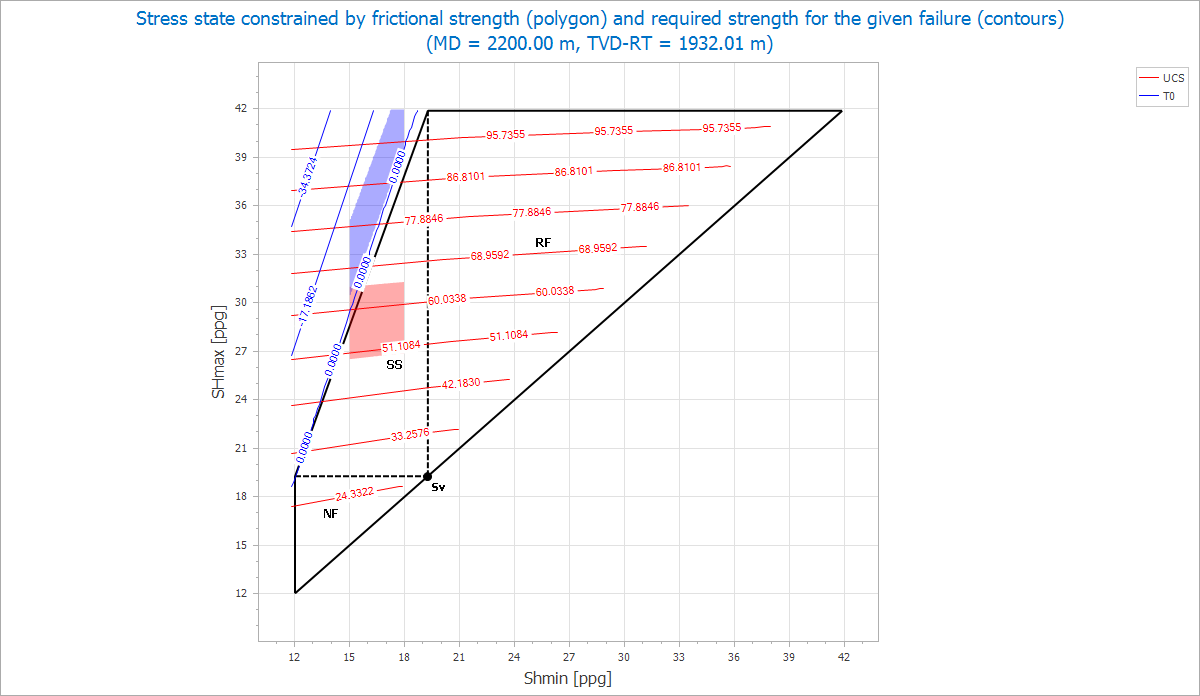
The stress polygon view showing the stress contours for UCS and T0 along with the shaded areas. The shaded areas are based on the boundary conditions that you set in the Constrains tab of the options Pane. click to enlarge